
WordPress on AWS Lightsail
Completed January 2026 · Updated September 2026
This project documents the migration of a live WordPress business website to AWS Lightsail, including DNS, SSL, static IP configuration, backup design, a production incident, and the redesign of the recovery strategy using automated snapshots.
Context
This project was built to migrate a live guitar teaching business website from traditional managed hosting to AWS, with lower ongoing cost and more direct control over the infrastructure. It is a live production site supporting an active teaching business.
Live site: cliffsmithguitarlessons.co.uk (production WordPress site hosted on AWS Lightsail)
Key constraints:
- The site had to remain publicly available during migration, with minimal disruption.
- HTTPS, email-related DNS records, and redirects all had to keep working correctly after cutover.
- The solution needed to stay simple enough to manage as a solo operator while still being recoverable.
Architecture (Initial Design)
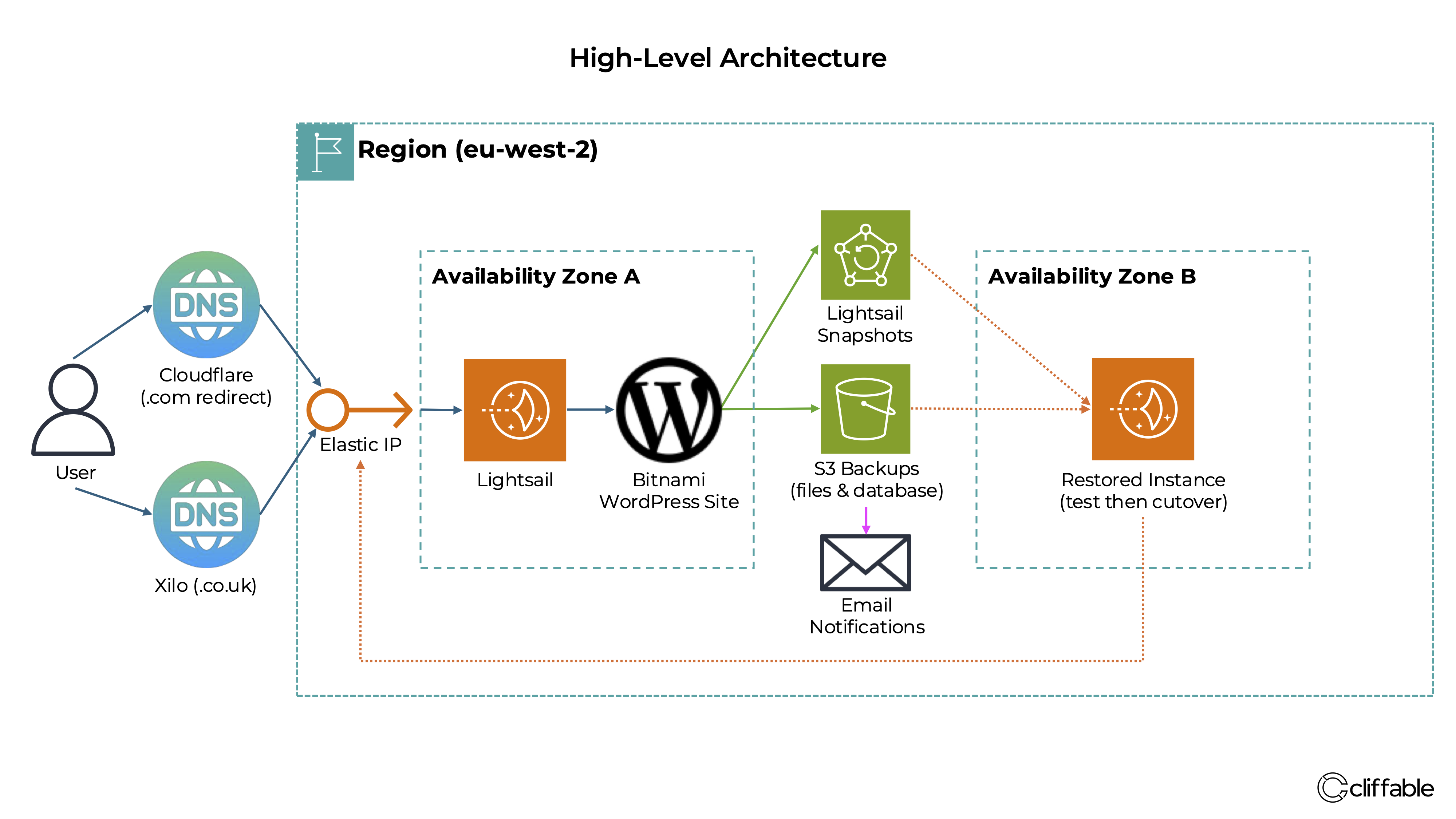
The website originally ran on an Amazon Lightsail instance in the London region using a Bitnami WordPress stack, with a static IP, DNS and SSL providing a stable HTTPS endpoint.
The original recovery model combined Lightsail snapshots with S3-based backups. Lightsail kept the production stack simple and cost-effective without the overhead of a more complex EC2-based architecture.
Key Decisions
Use Amazon Lightsail instead of a fully custom EC2-based architecture
Why: Lightsail provided a fast, simple way to deploy a production-ready WordPress environment with predictable monthly cost and minimal setup overhead.
Trade-off: Reduced flexibility compared to a custom architecture using EC2, ALB and RDS, and less control over scaling and infrastructure design.
Attach a static IP to ensure a stable public endpoint
Why: A fixed IP simplifies DNS configuration and ensures the site remains reachable even if the underlying instance is restarted or replaced.
Trade-off: Introduces a small amount of additional infrastructure management and dependency on correct IP association.
Implement an initial layered backup strategy using snapshots and S3
Why: The initial design combined Lightsail snapshots with S3 backups to provide redundancy and support recovery from both instance-level and application-level failures.
Trade-off: Adds operational overhead and requires ongoing validation to ensure backups are usable.
Maintain direct control of DNS during migration
Why: Managing DNS directly allowed precise control over cutover timing and ensured that web traffic, SSL validation, and email records were handled correctly.
Trade-off: Increased complexity during migration and a higher risk of misconfiguration if not handled carefully.
Challenges
Preserving DNS and email behaviour during migration
Migrating the site required more than moving the web server. DNS changes had to preserve existing MX, SPF, DKIM and DMARC records to avoid disrupting email delivery. This required careful validation before and after cutover to ensure both the website and email services continued to function correctly.
Managing a self-hosted WordPress stack on AWS
Moving away from managed hosting introduced responsibility for server updates, SSL configuration, redirects and recovery planning. While this provided greater control and significantly reduced cost, it also required a deeper understanding of the underlying Bitnami and Apache configuration.
Incident and Redesign
During routine maintenance, a sequence of issues exposed weaknesses in the original backup and recovery approach.
What happened:
- System update failed due to incorrect /tmp permissions
- SSL renewal reintroduced conflicting Apache redirect rules
- Resulting redirect loop took the site offline
The site was recovered by auditing and correcting configuration across multiple Apache and WordPress files, restoring a stable HTTPS setup with a canonical non-www domain.
Key failure:
A restore test using the existing S3 backup process failed. The process relied on partial backups (database dump + wp-content) and required manual reconstruction of the environment.
This revealed that the original S3 process was closer to a migration aid than a reliable recovery mechanism.
Production Architecture — May 2026
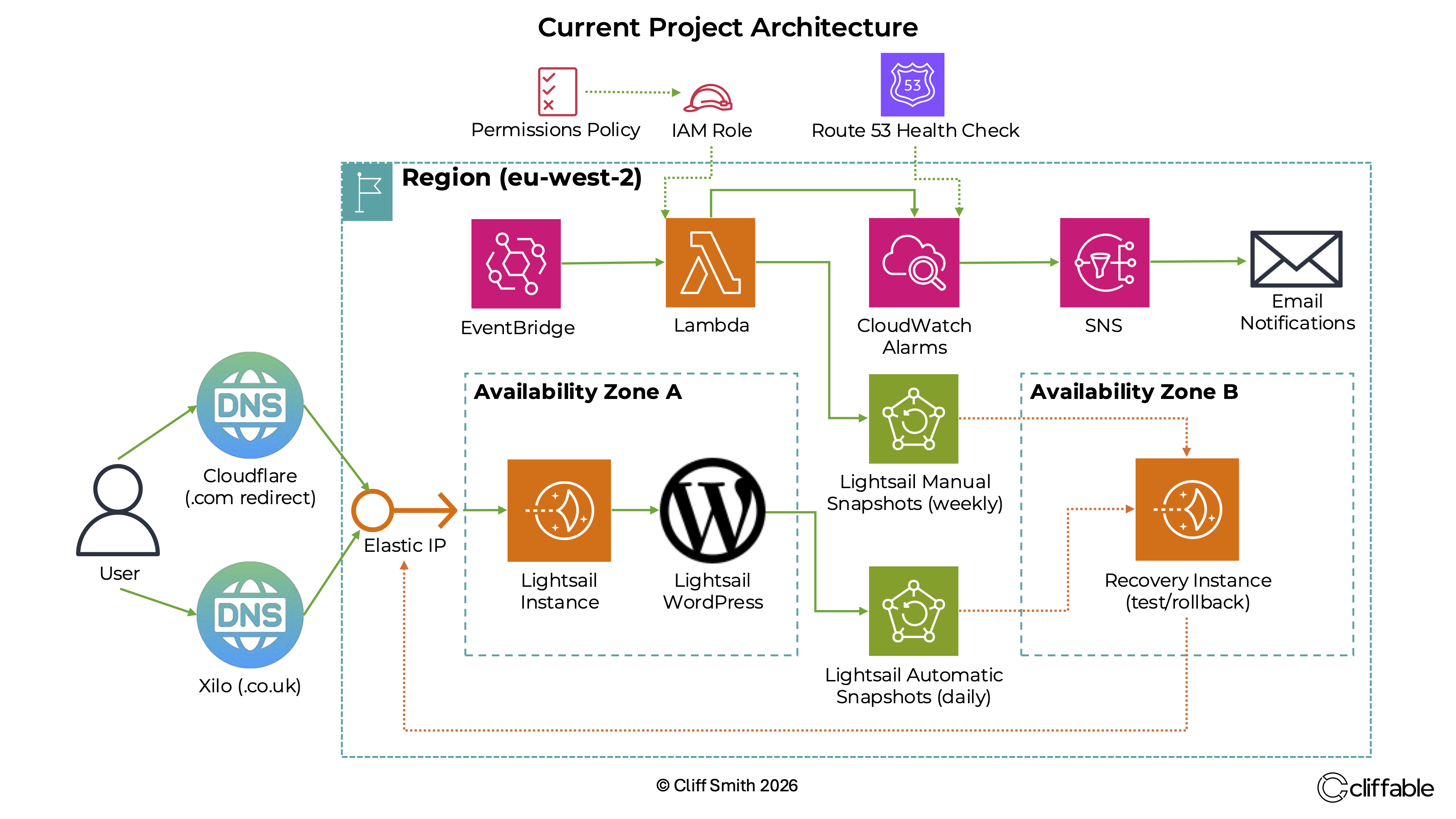
By May 2026, the architecture had evolved to include automated snapshots, external health checks, CloudWatch monitoring, SNS alerts and a tested recovery workflow.
The WordPress site remained on Lightsail in eu-west-2, with a separate recovery instance allowing snapshots to be restored and tested before production cutover.
Recovery & Backup Strategy
The original S3-based backup system was replaced with a snapshot-based recovery strategy using Amazon Lightsail.
New approach:
- Daily automatic snapshots (7-day rolling window — automatic snapshots in Lightsail are limited to 7 days)
- Weekly automated snapshots via Lambda (12-month retention, to bypass the above limitation)
An EventBridge schedule triggers a Lambda function to create weekly snapshots, with CloudWatch monitoring and SNS email alerts for failure detection.
Platform Migration
After AWS announced the retirement of Bitnami-packaged Lightsail blueprints, the site was migrated from the older Bitnami WordPress stack to the official AWS Lightsail WordPress blueprint.
Migration approach:
- Built a new official Lightsail WordPress instance in eu-west-2
- Migrated the full WordPress site using Duplicator after plugin size limits blocked the initial restore method
- Reattached the existing production static IP to avoid DNS propagation and preserve mail-related DNS behaviour
- Reconfigured HTTPS manually using Certbot after Lightsail SSL validation issues
- Updated the backup Lambda target and verified snapshot automation on the new instance
The migration preserved the live domain, email, SSL and recovery systems while moving production onto the official AWS Lightsail WordPress blueprint.
Monitoring & Operational Stability
After migration, the production site experienced intermittent instability caused by memory pressure on the 1 GB Lightsail instance, which had no swap configured.
Operational improvements implemented:
- Configured a persistent 1 GB swap file for improved stability under memory pressure
- Implemented Route 53 HTTPS health checks for external uptime monitoring
- Added CloudWatch alarms and SNS email notifications for outage detection
- Added Lightsail alarms for CPU utilisation, burst capacity and status check failures
- Validated end-to-end alerting using a real Apache outage test
Shortly after deployment, the monitoring system detected a genuine production outage caused by memory exhaustion. Further investigation and capacity analysis eventually led to an upgrade from 1 GB to 2 GB.
The incidents also prompted a wider review of WordPress security and infrastructure. Read: A WordPress Infrastructure Review →
Project Update — September 2026
Following further production instability and sustained automated login attempts, the architecture was extended to reduce direct exposure of the WordPress server.
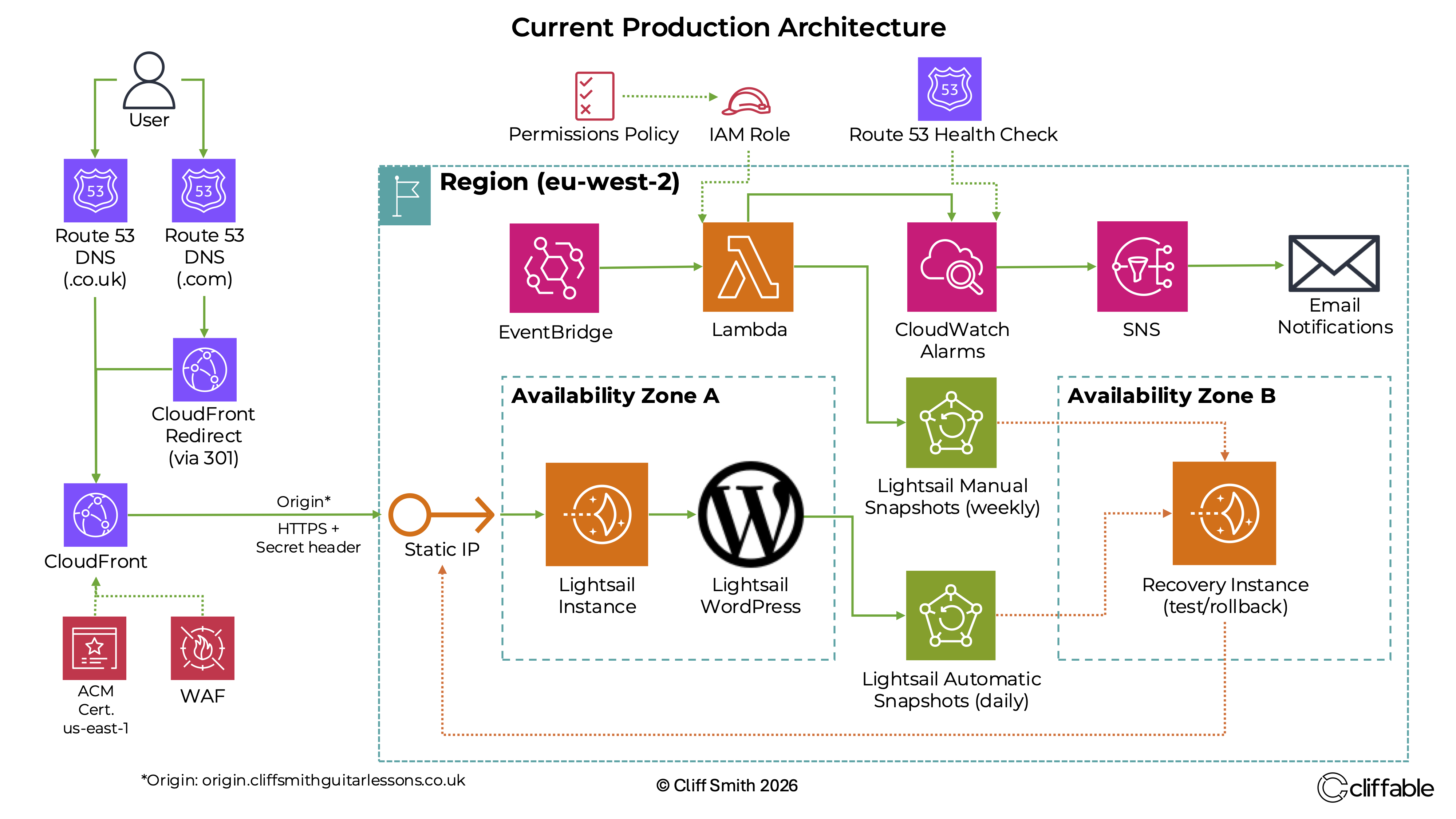
Domain and DNS management are now consolidated in Route 53, with public traffic passing through CloudFront and AWS WAF. The Lightsail origin is protected against direct access using a dedicated origin hostname and secret CloudFront header. WAF managed rules were tuned after production testing identified legitimate WordPress admin requests being blocked.
Monitoring was also extended with an application-level Route 53 health check and a separate CloudFront 5xx error-rate alarm, integrated with CloudWatch and SNS. End-to-end alerting was validated using controlled failure testing.
Read: Migrating a Production WordPress Site to CloudFront and AWS WAF →
Cost
Current production infrastructure cost: approximately $23–24/month including tax
- Lightsail → $17.95/month
- Route 53 → $1.60/month
- S3 → ~$0.01/month
- CloudFront, CloudWatch, Lambda and SNS → currently within free or included usage
The September 2026 AWS bill was $19.56 before tax, or $23.48 including tax. This reflects the evolved production architecture, including the larger 2 GB Lightsail instance, snapshots, DNS and monitoring infrastructure.
Previous managed hosting cost: £94.80/month (incl. VAT)
Although the AWS cost has increased as the architecture has developed, it remains substantially lower than the previous managed hosting service while providing greater control over hosting, monitoring, recovery and security.
Outcome
The project successfully moved a live business website from managed hosting to AWS and developed into a production platform with automated recovery, monitoring and security controls.
- Production WordPress hosting on AWS Lightsail
- Substantially lower hosting cost than the previous managed hosting service
- Automated snapshots and tested recovery workflows
- Route 53 health checks, CloudWatch monitoring and SNS alerts
- Migration from the deprecated Bitnami stack to the official Lightsail WordPress blueprint
- Domain and DNS management consolidated in Route 53
- CloudFront and AWS WAF added to protect the production site