
Designing a Secure AWS Infrastructure
Completed July 2026
Designing, implementing and validating a secure AWS architecture with private networking, controlled administrative access, Gateway VPC Endpoints and a custom least-privilege IAM policy.
Context
This project was built as a security-focused AWS infrastructure challenge. I was given a set of technical and security requirements, but not a finished architecture to reproduce.
Unlike previous labs, I designed the complete architecture in PowerPoint, including the route tables and IAM permissions policy, before creating any AWS resources. I then implemented the design, diagnosed the issues that arose and validated the completed infrastructure using a supplied Python script.
Key requirements:
- Place the workload EC2 instance in a private subnet with no public IP address.
- Provide secure SSH administration without exposing the private instance directly to the internet.
- Allow temporary internet access only while installing the required Python packages.
- Provide read-only access to Amazon S3.
- Provide read and write access to DynamoDB while preventing delete operations.
- Maintain access to S3 and DynamoDB after removing all workload internet connectivity.
Architecture
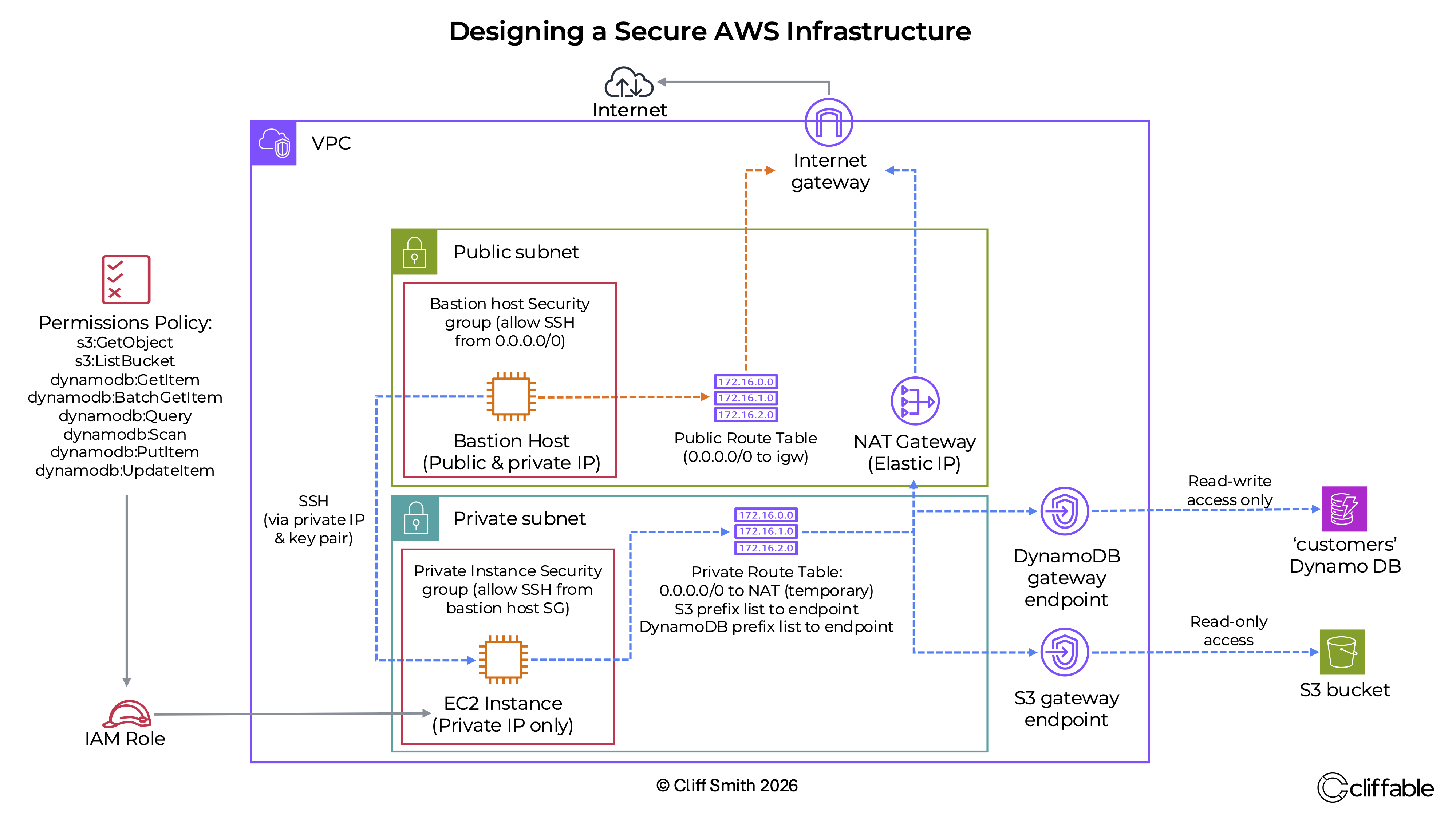
The architecture uses a custom VPC containing one public subnet and one private subnet. A bastion host in the public subnet provides the administrative path to the private EC2 instance, which has no public IP address.
A NAT Gateway provided temporary outbound internet access while the required Python packages were installed. After installation, its default route was removed from the private route table, leaving the workload without internet connectivity while keeping the NAT Gateway available for future use.
Gateway VPC Endpoints for Amazon S3 and DynamoDB provided private access to AWS services after the NAT route was removed, eliminating any dependency on internet connectivity.
Key Decisions
Design the architecture before implementation
Why: Translating the requirements into a completed diagram first made the purpose of each subnet, route, security group and endpoint clear before any resources were created.
Trade-off: More time was spent planning, but implementation and troubleshooting became far more straightforward.
Use a bastion host for SSH administration
Why: The bastion host provided an administrative entry point while allowing the workload instance to remain inside a private subnet with no public IP address.
Trade-off: The bastion host introduced an additional EC2 instance to secure, manage and monitor.
Use a NAT Gateway with temporary routing
Why: The private EC2 instance required outbound connectivity while
installing
boto3 and its dependencies.
Trade-off: A NAT Gateway adds cost even when it is not being used. After installation, I removed the private route table entry pointing to it, rather than deleting the gateway, so outbound internet access could be restored later if required.
Use Gateway VPC Endpoints for S3 and DynamoDB
Why: Gateway Endpoints allowed the private instance to communicate with S3 and DynamoDB without using the public internet or routing traffic through the NAT Gateway.
Trade-off: Endpoint routes and IAM permissions had to be configured correctly for each service.
Create a custom least-privilege IAM policy
Why: The workload required a precise combination of read-only S3 access and read/write DynamoDB access without delete permissions.
Trade-off: Writing a custom policy required more care than attaching a broad AWS-managed policy, but it avoided granting unnecessary permissions.
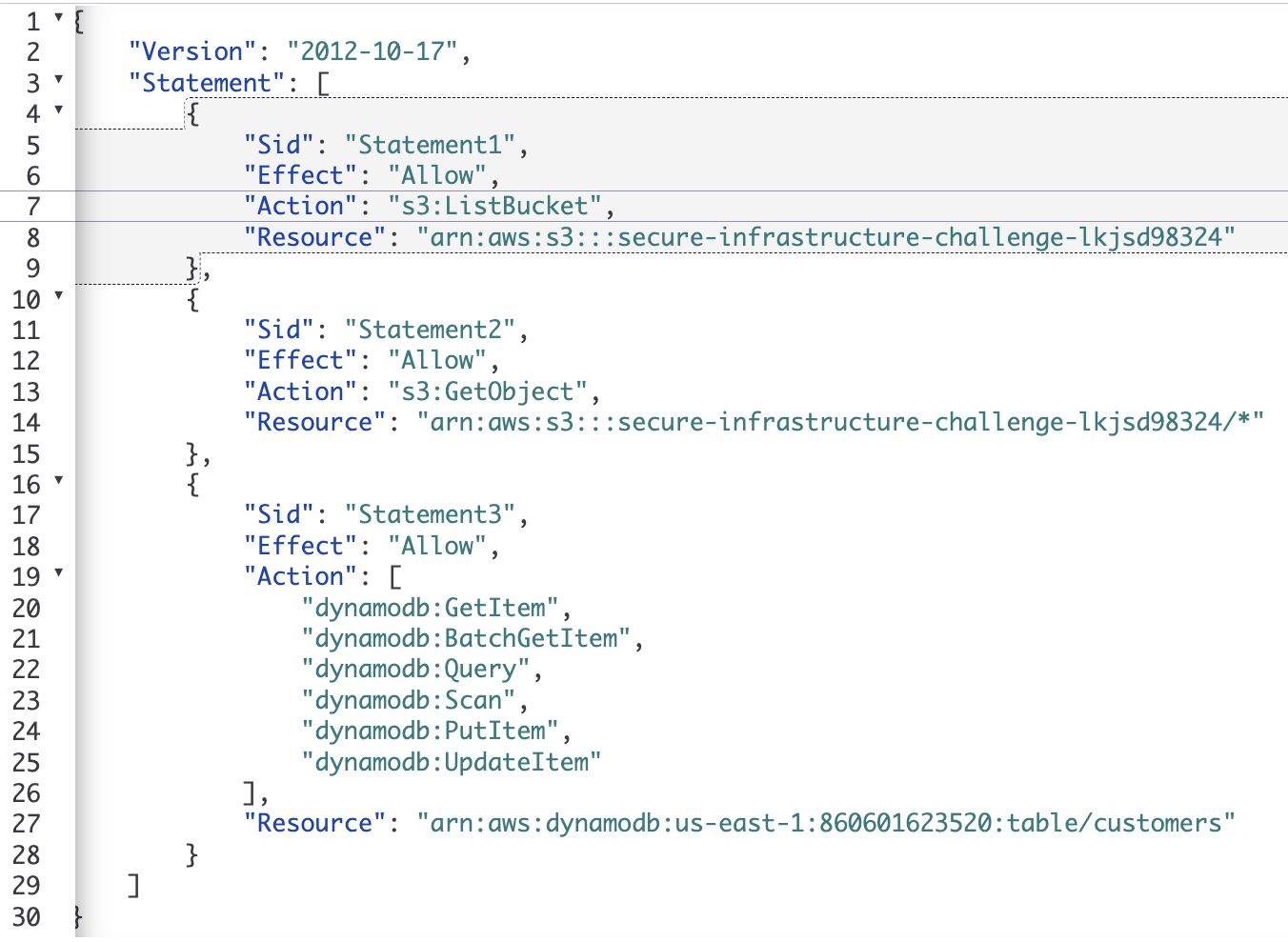
I wrote the IAM permissions policy from scratch rather than attaching a broad AWS-managed
policy. It
grants
GetObject and ListBucket access to Amazon S3, along with the required
DynamoDB
read and write actions. Delete permissions were intentionally excluded.
The custom policy was attached to an IAM role assigned to the private EC2 instance, enforcing least-privilege access to Amazon S3 and DynamoDB.
Challenges
Connecting from the bastion host to the private instance
My initial SSH approach failed because the private EC2 instance required key-pair authentication. I launched a replacement instance with the correct key pair and successfully connected through the bastion host.
Missing IAM credentials on the replacement EC2 instance
The validation script initially failed after the EC2 instance was replaced. Networking and endpoint access appeared correct, so I checked the instance credentials and discovered that the replacement instance had been launched without the required IAM role. Attaching the correct IAM role resolved the issue and the validation script completed successfully.
Removing internet access without breaking AWS service connectivity
After installing the required software, I removed the default route to the NAT Gateway from the private route table and confirmed that the instance could no longer reach the public internet. S3 and DynamoDB operations continued to work through their Gateway VPC Endpoints, proving that the private service paths were configured correctly.
Cost
Infrastructure cost: Minimal short-term lab cost. The environment was created for implementation and validation rather than continuous operation.
- EC2 instances → charged only while the bastion and private instances were running.
- NAT Gateway → retained for possible future use and continued to incur an hourly charge while deployed.
- Gateway VPC Endpoints for S3 and DynamoDB → no hourly endpoint charge.
- Amazon S3 and DynamoDB → negligible usage during validation.
The NAT Gateway remained deployed, but removing its route from the private subnet eliminated internet access while preserving the option to restore connectivity later.
Outcome
The completed infrastructure met all of the original security and access requirements. The final validation script confirmed that the workload retained only the intended network paths and AWS permissions.
- SSH access through the bastion host succeeded.
- The private EC2 instance had no public IP address and no active route to the internet.
- Amazon S3 read operations succeeded.
- Amazon S3 write operations were denied.
- DynamoDB read and write operations succeeded.
- DynamoDB delete operations were denied.
- IAM role credentials were supplied automatically to the instance.
- S3 and DynamoDB remained accessible after the route to the NAT Gateway was removed.
- The supplied infrastructure validation script completed successfully.
This project marked a significant step towards independent cloud architecture, from translating requirements into a design through to implementation, troubleshooting and successful validation.
Related projects can be viewed on the AWS architecture projects page.
Next Steps
A production version of this architecture could replace the bastion host with AWS Systems Manager Session Manager, eliminating inbound SSH access.
It could also be deployed across multiple Availability Zones, managed with CloudFormation and enhanced with additional monitoring and logging.