
Secure AWS VPC with Bastion Host
Completed May 2026
A secure AWS networking project using public and private subnets, a bastion host, NAT Gateway, Internet Gateway and route tables to control access to private EC2 instances.
Context
This project was built as a practical AWS networking lab to understand how secure access to private compute resources can be designed inside a VPC.
Key constraints:
- Keep the private EC2 instance inaccessible directly from the public internet.
- Allow controlled SSH access through a bastion host in the public subnet.
- Allow the private instance to reach the internet for updates and external services without exposing it to inbound internet traffic.
Architecture
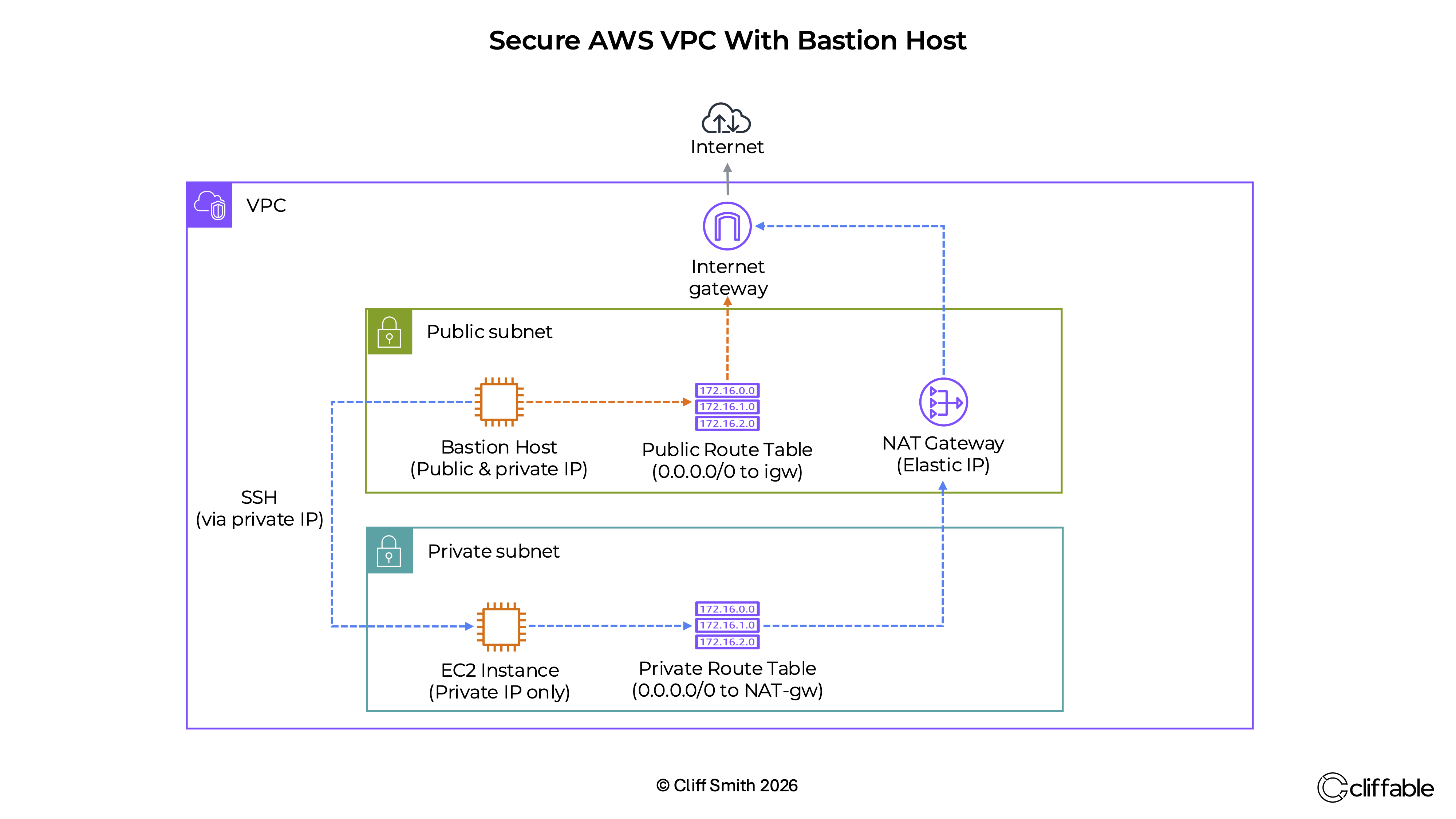
The architecture uses a single VPC divided into a public subnet and a private subnet. The bastion host sits in the public subnet and has both a public and private IP address. The private EC2 instance sits in the private subnet and has only a private IP address.
Administrative SSH access is routed through the bastion host (via private IP addresses), rather than exposing the private instance directly. Outbound internet access from the private subnet is handled through a NAT Gateway in the public subnet, which then routes traffic through the Internet Gateway.
Key Decisions
Use a bastion host as the single administrative entry point
Why: This allows SSH access to private resources without assigning public IP addresses to those resources.
Trade-off: The bastion host becomes an important security boundary and must be tightly controlled, monitored and patched.
Place application compute resources in a private subnet
Why: This reduces attack surface by preventing direct inbound access from the internet.
Trade-off: Additional networking components are required for access, troubleshooting and outbound connectivity.
Use a NAT Gateway for outbound internet access from the private subnet
Why: Private instances often need to download updates, install packages or call external APIs without being reachable from the internet.
Trade-off: NAT Gateways add cost and need to be considered carefully in small lab environments.
Challenges
Understanding why I could not SSH into either instance initially
Initially I could not SSH into either instance, even from within my AWS account. I learned that EC2 instances are launched without a public IP address by default, even when launched into public subnets.
The private instance had no public IP address and could not be reached from the internet. The solution was to access it through the bastion host using its private IP address, but this was only possible after relaunching the public instance with a public IP address.
Security group configuration also played an important role in connectivity. SSH access to the private instance was restricted to traffic originating from the bastion host.
Separating inbound access from outbound internet access
The bastion host and NAT Gateway solve different problems. The bastion host provides controlled inbound administrative access, while the NAT Gateway provides outbound internet access for private resources.
Clarifying route table behaviour
The project reinforced that route tables are associated with subnets and control where traffic is sent. The public subnet routes internet-bound traffic to the Internet Gateway, while the private subnet routes outbound internet traffic to the NAT Gateway.
Cost
This project was built as a temporary AWS networking lab rather than a continuously running environment, so long-term infrastructure cost optimisation was not a primary focus.
However, the project reinforced the importance of cost awareness when working with cloud infrastructure. Resources were terminated after testing was complete to avoid unnecessary ongoing charges.
Main cost considerations:
- Amazon EC2 instances → Small instance types were used for testing purposes only
- NAT Gateway → Main potential cost driver if left running continuously
- VPC, subnets, route tables and Internet Gateway → No direct hourly charge
In a production environment, NAT Gateway uptime, data transfer and high-availability design would require more detailed cost analysis.
Outcome
The project successfully demonstrated a secure AWS VPC design where private compute resources can be accessed administratively without being exposed directly to the internet.
- Built a VPC with separate public and private subnets.
- Configured bastion-based SSH access to a private EC2 instance.
- Enabled outbound internet access from the private subnet through a NAT Gateway.
- Verified SSH access to the private instance via the bastion host using private IP addresses.
- Verified outbound internet connectivity from the private subnet by successfully pinging google.com through the NAT Gateway.
- Improved understanding of route tables, subnet associations and AWS network boundaries.
Related projects can be viewed on the AWS architecture projects page.
Next Steps
Future improvements could include replacing SSH access with AWS Systems Manager Session Manager, tightening security group rules further, adding VPC Flow Logs, and expanding the design into a multi-AZ architecture for higher availability.