
Server-Based to Serverless Website Hosting on AWS
Completed July 2026
Deploying a highly available EC2-based website, integrating its serverless microservices and then migrating the frontend to Amazon S3 and CloudFront to compare the complexity, cost and operational requirements of both architectures.
Context
This project was completed as part of the AWS Solutions Architect Associate module of the Digital Cloud Training Cloud Mastery Bootcamp .
The lab simulated the migration of a legacy portfolio website from a single-server deployment to AWS. A pre-built website application, Amazon Machine Image (AMI) and four CloudFormation templates were provided as the project baseline. My role was to deploy, configure and integrate these components, build a highly available AWS infrastructure, and then migrate the frontend to a serverless hosting architecture while preserving the existing microservices.
To better understand and document the solution, I produced my own architecture diagrams throughout the project rather than relying on the reference diagram supplied with the lab.
My responsibilities included:
- Deploying and configuring the EC2-hosted application
- Integrating and testing four serverless microservices
- Configuring IAM permissions, Function URLs, APIs and S3 event notifications
- Building a custom VPC spanning two Availability Zones
- Implementing Application Load Balancing, Auto Scaling, CloudFront, ACM and Route 53
- Migrating the frontend from EC2 to a private Amazon S3 bucket
- Securing the S3 origin using CloudFront Origin Access Control (OAC)
- Troubleshooting CORS, caching and application integration issues
- Documenting and comparing the server-based and serverless architectures
Server-Based Architecture
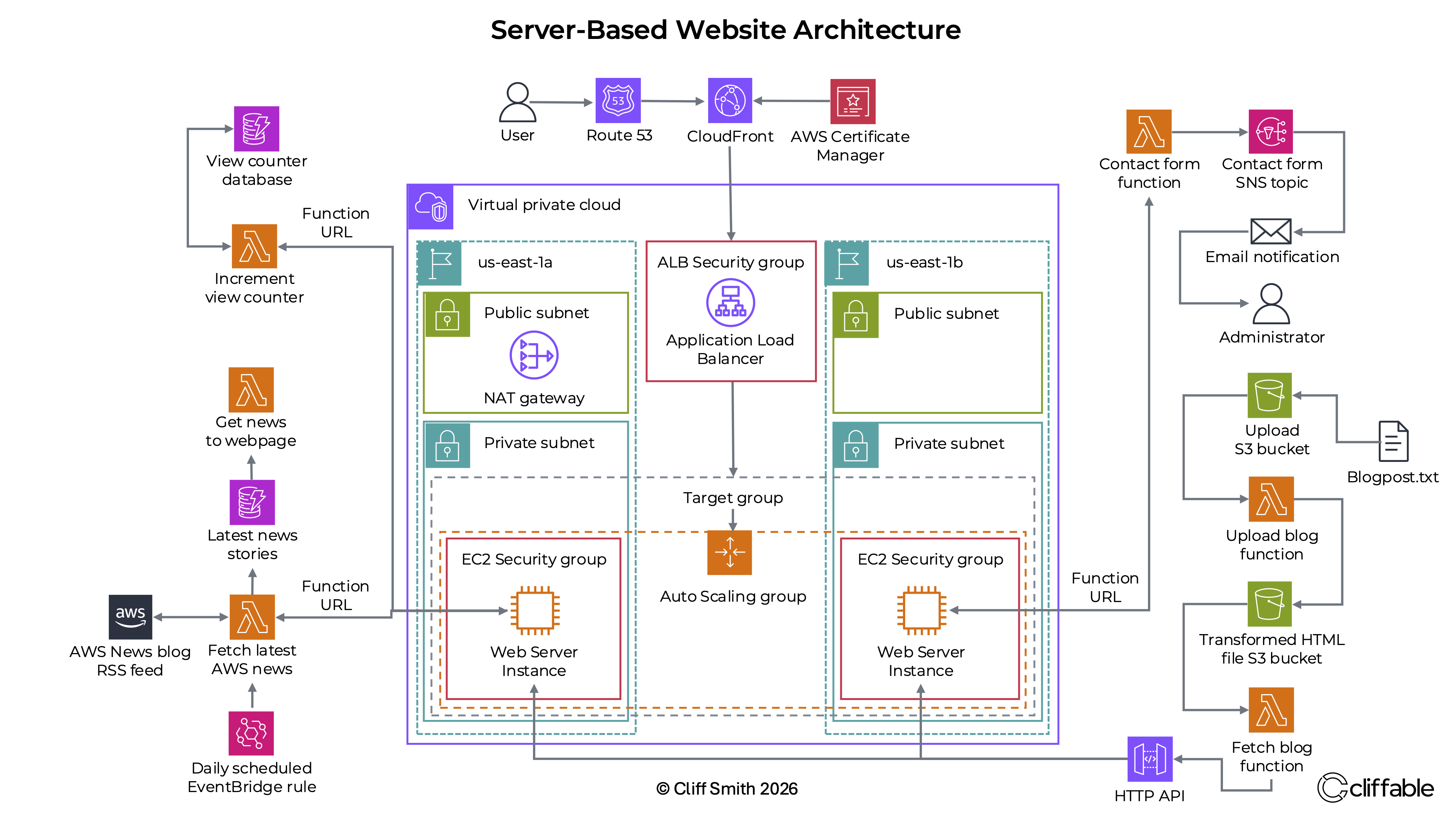
The first stage was to deploy the website on Amazon EC2 and build a highly available architecture around it. DNS was handled by Amazon Route 53, with an ACM certificate providing HTTPS and Amazon CloudFront delivering content to users.
Requests reaching the AWS Region were forwarded to an internet-facing Application Load Balancer deployed across public subnets in two Availability Zones. The load balancer distributed traffic to EC2 instances in private subnets through a target group.
The EC2 instances were managed by an Auto Scaling Group using a launch template based on a custom AMI created after the application and microservice integrations had been configured. This allowed instances to be replaced or added automatically while keeping them inaccessible directly from the internet.
A NAT Gateway allowed the private instances to initiate outbound connections without requiring public IP addresses. Separate security groups controlled traffic between the load balancer and EC2 instances.
This architecture provided high availability through load balancing, automated instance replacement and resources spread across two Availability Zones. However, it also required a substantial amount of supporting infrastructure for a frontend consisting primarily of static HTML, CSS and JavaScript files.
Application Microservices
Four CloudFormation templates were provided to deploy most of the serverless application components. After deployment, each service still required configuration, integration and testing.
View Counter
A Lambda Function URL provided a public endpoint used by the website to retrieve and update the page view count.
Contact Form
The website submitted contact form data to a Lambda Function URL. The integration initially
failed
because the Function URL CORS configuration did not allow the required POST method and
Content-Type header.
AWS Latest News
One Lambda function retrieved AWS RSS content and stored processed entries in DynamoDB. A second function exposed the latest entries to the website through a Function URL.
Blog Publishing
Uploading a text file to an S3 bucket generated an S3 Event Notification that invoked a Lambda function. The function converted the text into processed HTML content, which was retrieved through an HTTP API and displayed on the portfolio page.
The dynamic features were already separated from the frontend. This became important during the migration because the hosting layer could be replaced without redesigning the microservices.
Why Migrate to Serverless Hosting?
Once the server-based architecture was complete, the next stage was to assess whether its complexity was justified by the workload.
The frontend consisted almost entirely of static files. Its dynamic functionality was already handled by independent Lambda, DynamoDB, S3 and API services. The EC2 instances were therefore being used mainly to serve files that could be stored and delivered directly by managed AWS services.
The Application Load Balancer, Auto Scaling Group, EC2 instances, NAT Gateway, subnets, route tables and security groups all contributed to availability, but they also introduced cost, configuration and ongoing operational responsibility.
Migrating the frontend to Amazon S3 and CloudFront offered a simpler architecture that still met the application's availability, scalability and security requirements.
Serverless Architecture
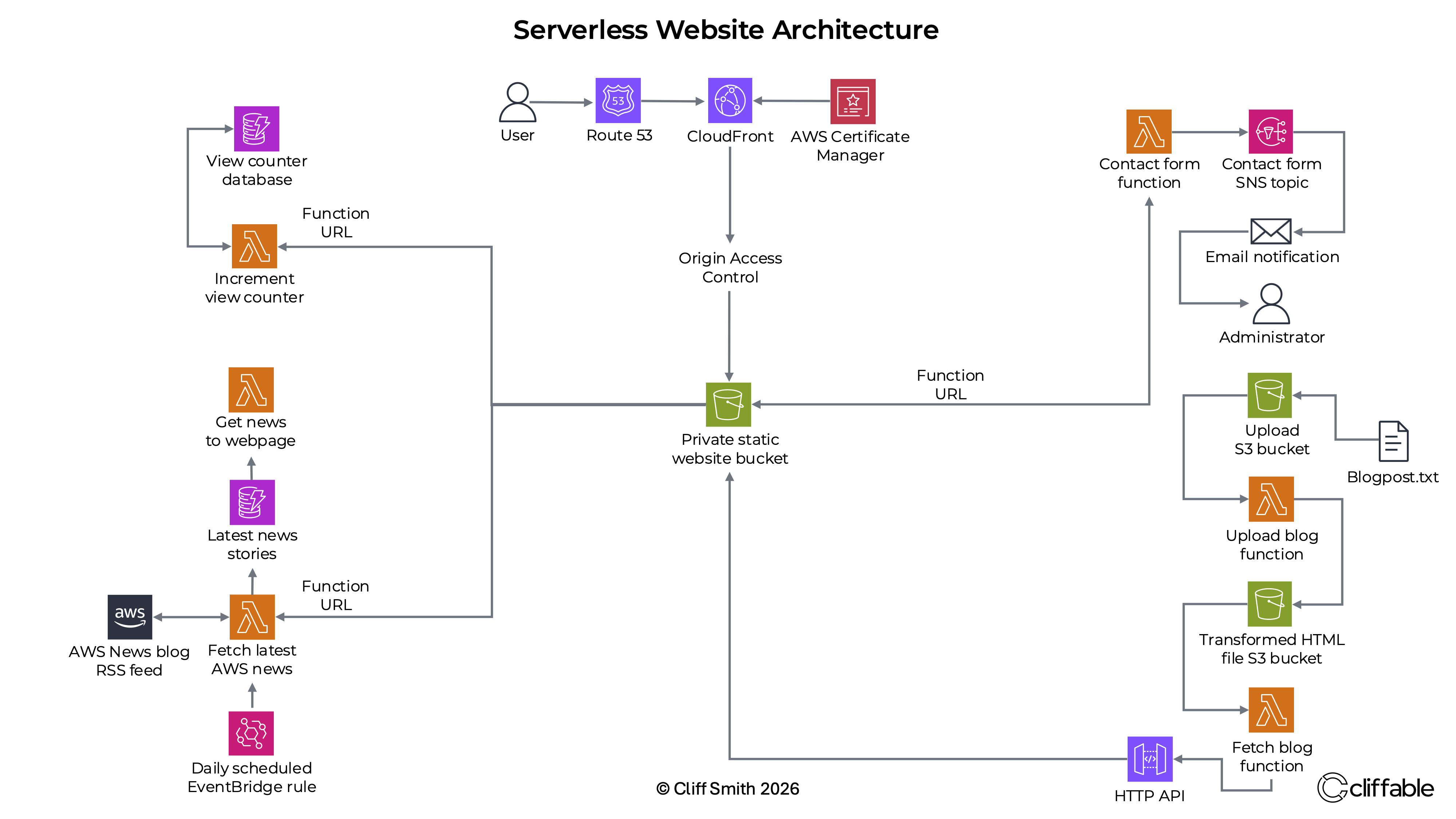
In the final architecture, Amazon Route 53 continued to provide DNS and CloudFront continued to provide HTTPS delivery and edge caching. The major change was the origin.
The EC2 hosting layer was replaced with a private Amazon S3 bucket containing the website files. CloudFront accessed the bucket through Origin Access Control, allowing S3 Block Public Access to remain enabled.
Users could retrieve the website only through CloudFront. The S3 bucket did not need to be exposed as a public website endpoint.
The existing view counter, contact form, AWS Latest News service and blog workflow remained in place. The migration changed the frontend hosting architecture without removing the application's event-driven functionality.
The serverless design remained highly available. Amazon S3 Standard stores data redundantly across multiple Availability Zones, while CloudFront distributes cached content through its global edge network. No server provisioning, load balancing or scaling configuration was required.
Architecture Comparison
Viewing the two diagrams together shows how much infrastructure was removed when the frontend migrated to serverless hosting.
Server-Based Architecture
Serverless Architecture
Infrastructure removed from the hosting path:
- Custom VPC
- Public and private subnets
- Internet Gateway (not shown in diagram)
- Route tables (not shown in diagram)
- NAT Gateway
- Application Load Balancer
- Target Group
- Auto Scaling Group
- Launch Template
- EC2 instances
- Load balancer and instance security groups
Services retained:
- Amazon Route 53
- AWS Certificate Manager
- Amazon CloudFront
- AWS Lambda
- Amazon DynamoDB
- Amazon S3 resources used by the blog workflow
- Lambda Function URLs and the HTTP API
- Event-driven application workflows
| Decision factor | Server-Based | Serverless | Verdict |
|---|---|---|---|
| Frontend hosting | EC2 instances behind an Application Load Balancer and CloudFront | Private S3 bucket behind CloudFront | Serverless |
| High availability | Requires load balancing, Auto Scaling and instances distributed across two Availability Zones | Provided automatically by Amazon S3 and CloudFront | Serverless |
| Scaling | Auto Scaling policies and capacity settings must be configured and maintained | Scaling is handled automatically by AWS managed services | Serverless |
| Infrastructure to manage | VPC, public and private subnets, NAT Gateway, Application Load Balancer, Auto Scaling, EC2, security groups and CloudFront | S3, CloudFront and Origin Access Control | Serverless |
| Server maintenance | Operating system, web server and application environment require maintenance | No servers or operating systems to patch and maintain | Serverless |
| Frontend security | Private EC2 instances protected by security groups and accessed through the load balancer | Private S3 bucket protected by CloudFront Origin Access Control | Either |
| Static website hosting | Fully capable, but requires substantial supporting infrastructure | Well suited to simple, scalable static content delivery | Serverless |
| Overall assessment | Highly available and flexible, but unnecessarily complex for this workload | Highly available, simpler to operate and better aligned with the static frontend | Serverless |
Key Decisions
Place EC2 instances in private subnets
Why: The Application Load Balancer provided the public entry point, so the instances did not require public IP addresses or direct internet access.
Trade-off: Private instances required additional networking infrastructure, including a NAT Gateway for outbound access.
Create a custom AMI for the Auto Scaling Group
Why: The application files, configuration and microservice endpoint changes needed to be available on every instance launched by Auto Scaling.
Trade-off: Future application changes would require a new AMI or an automated deployment process.
Retain the existing serverless microservices
Why: The dynamic application features were already decoupled from the hosting layer and continued to work after the frontend migration.
Trade-off: The frontend still depended on several independently configured endpoints and CORS policies.
Use a private S3 origin with CloudFront Origin Access Control
Why: This allowed CloudFront to retrieve the site while keeping direct public access to the bucket blocked.
Trade-off: CloudFront and the S3 bucket policy had to be configured correctly before the site could be served.
Challenges
Troubleshooting CloudFront after the S3 migration
After migrating the frontend to Amazon S3, CloudFront initially failed to serve the website correctly despite the bucket contents, default root object, Origin Access Control and bucket policy appearing to be correctly configured. The issue was ultimately traced to the CloudFront cache and origin request policy configuration. Switching to the managed CachingOptimized cache policy, with no Origin Request Policy attached, resolved the problem.
Contact form requests were blocked by CORS
The contact form endpoint existed, but browser requests failed because the Function URL did not permit the required POST method and Content-Type header. Updating the Function URL CORS settings allowed the browser to submit the request successfully.
Testing the blog workflow
The portfolio page was present, but the publishing process had not initially been tested. Uploading a plain text file to the input bucket confirmed that the S3 Event Notification invoked the post creation Lambda, generated processed HTML and made the post available through the HTTP API. Further testing confirmed that multiple posts were supported.
Maintaining endpoint configuration
Several JavaScript files required the correct API or Function URL to be inserted manually. Recreating a CloudFormation stack could generate a different endpoint, requiring the frontend configuration to be updated again.
Cost
This project was completed in a temporary training environment, so long-term operating costs were not measured.
Although both architectures use CloudFront, Route 53 and the supporting serverless microservices, the server-based solution also requires continuously running infrastructure including EC2, an Application Load Balancer, a NAT Gateway and EBS storage.
For a low-traffic static website, migrating the frontend to Amazon S3 removes these always-on resources, reducing both infrastructure costs and operational overhead while maintaining high availability.
Lessons Learned
The most important lesson from this project was not simply how to configure the individual AWS services. It was seeing how dramatically the architecture changed when the hosting model was matched more closely to the workload.
The server-based design successfully delivered high availability. However, it required load balancing, Auto Scaling, private networking, outbound routing, instance images and security controls to keep a relatively simple frontend available.
Moving the static files to S3 and CloudFront removed most of this infrastructure while preserving the same application functionality. Availability did not disappear; responsibility for it shifted from infrastructure that I had to configure to managed AWS services.
Creating my own architecture diagrams throughout the project was also a valuable part of the learning process. The diagrams helped me understand the request path, security boundaries and dependencies, and made the reduction in complexity clearly visible after the migration.
The project reinforced an important architectural principle: the most complex solution is not necessarily the most appropriate one. Where the requirements allow it, choosing managed services and removing unnecessary infrastructure can reduce cost, operational overhead and the number of potential failure points.
Outcome
The project delivered both a highly available server-based website and a complete migration of its frontend to serverless AWS hosting.
- Deployed and integrated the EC2-based application
- Configured and tested four independent serverless microservices
- Built a custom multi-AZ VPC architecture
- Implemented load balancing and automated EC2 scaling
- Protected private EC2 instances from direct internet access
- Migrated the frontend to Amazon S3 and CloudFront
- Secured the S3 origin using Origin Access Control
- Preserved all event-driven application functionality
- Resolved CloudFront caching, CORS and integration issues
- Documented the migration through original architecture diagrams and this project page
The migration replaced infrastructure-managed availability with managed-service availability while substantially reducing the number of components required to host the website.
Next Steps
A logical extension would be to replace the separate public Lambda Function URLs with a consolidated API layer using Amazon API Gateway. This could provide a more consistent endpoint structure and centralised controls for routing, authentication, throttling and monitoring.
The frontend deployment could also be automated using a source control and CI/CD workflow, allowing changes to be tested and uploaded to S3 automatically before invalidating the relevant CloudFront cache paths.
For a production implementation, I would also review logging, monitoring, alarms, AWS WAF protection and tighter CORS restrictions rather than allowing unrestricted origins.