
Static Website on AWS with CI/CD (S3 + CloudFront)
Completed April 2026
This project documents how I built, deployed and iterated on a static website on AWS using S3 for storage, CloudFront for content delivery, Route 53 for DNS and ACM for HTTPS. It also covers automated deployment, version control, SEO improvements, search indexing, key decisions, challenges and running costs.
Context
This project was built to create a fast, secure and low-maintenance portfolio site on AWS. It is used in production to serve this website.
Key constraints:
- Keep the architecture simple and low cost
- Serve the site securely over HTTPS
- Maintain minimal operational overhead
- Make updates easy to manage and recover
Architecture
Runtime Architecture
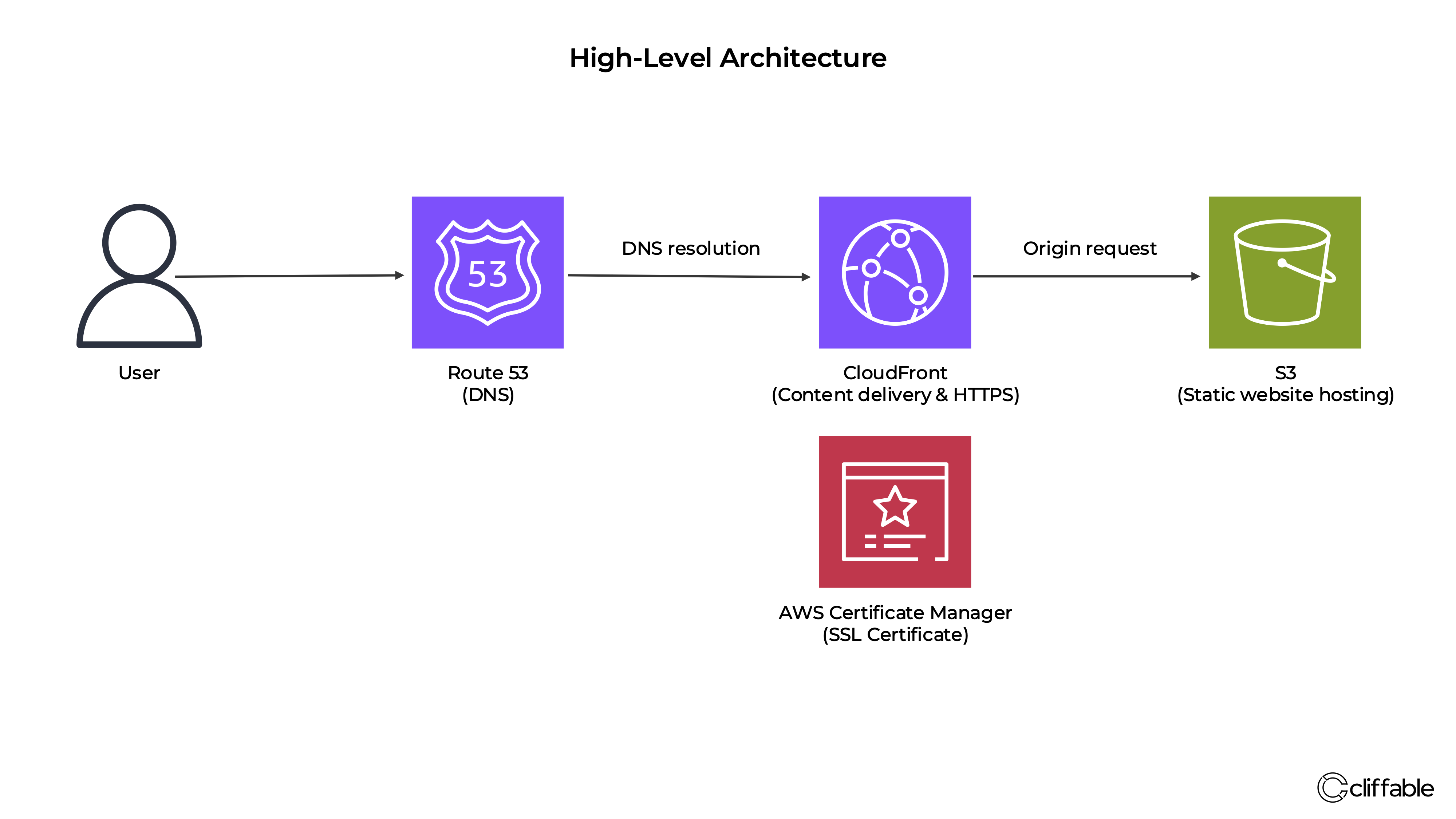
User requests are routed through Route 53 to a CloudFront distribution, which serves cached content from an S3 bucket. ACM provides the SSL certificate used for HTTPS delivery through CloudFront.
The site is built as static HTML and CSS, with updates managed locally and version-controlled in GitHub before deployment to AWS.
This setup keeps the architecture simple while using managed services for storage, delivery and DNS, reducing operational overhead compared with managing a server-based solution.
Key Decisions
Use CloudFront in front of S3
Why: This improves performance through caching, enables HTTPS delivery, and allows the S3 origin to remain private instead of exposing a public bucket.
Trade-off: It adds another layer to configure compared with serving directly from S3.
Use Route 53 for DNS
Why: It integrates cleanly with AWS resources and makes domain routing straightforward.
Trade-off: It keeps DNS management inside AWS rather than using an external provider.
Use Git and GitHub for version control
Why: This provides a clear backup and change history for the site, making updates safer and easier to roll back if needed.
Trade-off: It adds an extra step to the workflow and requires discipline to keep changes committed consistently.
Automate deployment with GitHub Actions
Why: This removes manual S3 uploads and creates a repeatable deployment workflow from GitHub to AWS.
Trade-off: It requires additional setup across GitHub Actions, IAM and CloudFront permissions.
Use OIDC instead of long-lived AWS access keys
Why: OIDC allows GitHub Actions to assume an AWS role securely without storing static AWS credentials in GitHub.
Trade-off: It is more complex to configure than simple access keys, but provides a stronger security model.
Build SEO and indexing into the site structure
Why: Clear page titles, meta descriptions, canonical tags and internal linking help search engines understand the site and improve discoverability.
Trade-off: It adds content and markup decisions that need to be maintained alongside the technical build.
Challenges
S3 access and CloudFront permissions
Resolving 403 Access Denied errors caused by misaligned bucket policy and CloudFront Origin Access Control configuration.
HTTPS and custom domain setup
Configuring ACM, CloudFront and Route 53 in the correct order to enable certificate validation and domain routing.
Deployment and cache consistency
Making sure updated HTML, CSS and assets were actually reflected on the live site, including handling CloudFront invalidations and browser caching during testing.
Secure CI/CD permissions
Configuring GitHub Actions to deploy using OIDC, with an IAM role restricted to the repository, main branch, S3 bucket and CloudFront invalidation permissions required for the site.
Search visibility and crawl readiness
Improving page titles, descriptions, canonical tags and internal linking so the site was better structured for indexing and easier for search engines to interpret.
Deployment Automation
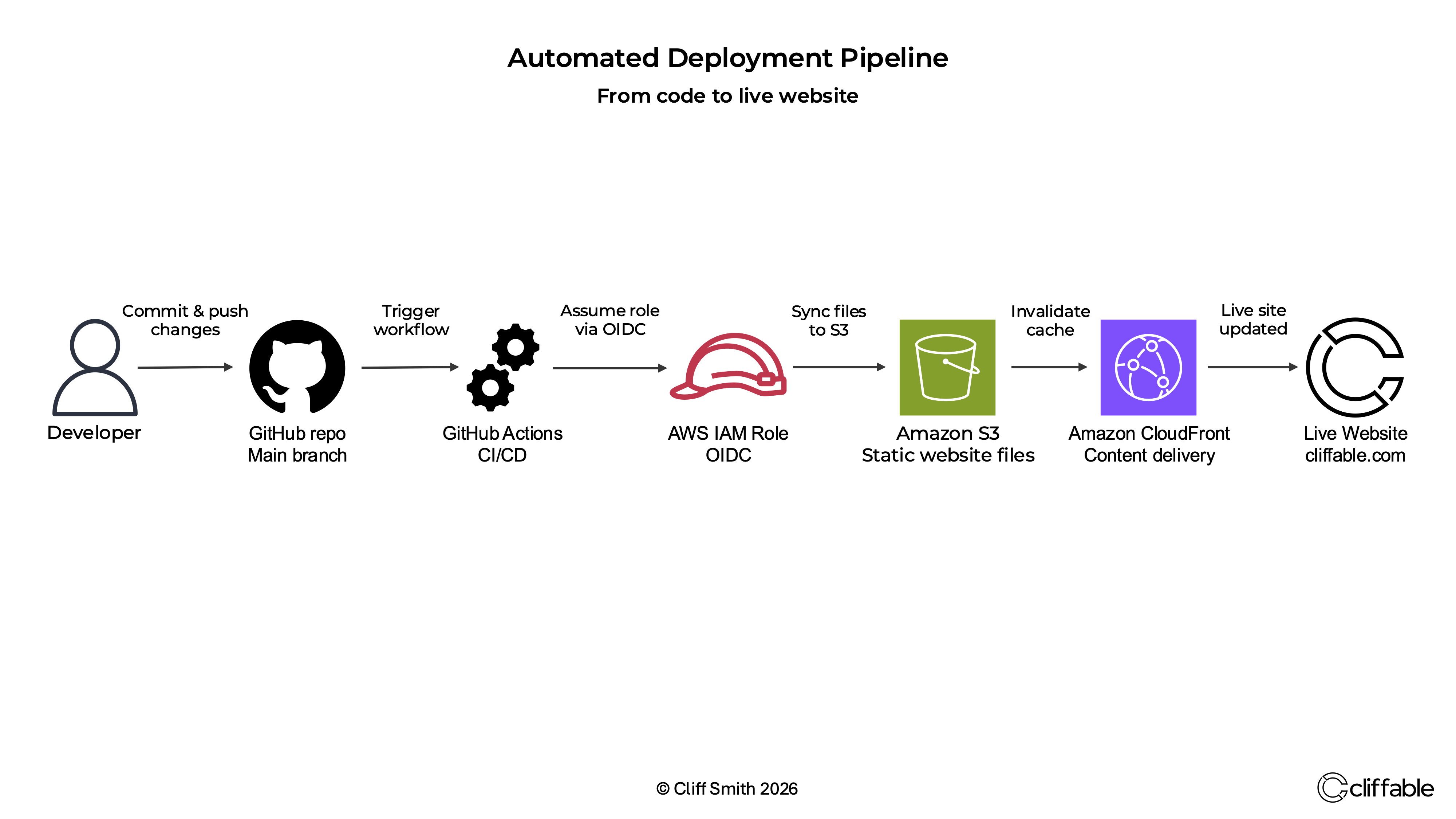
Deployment is automated through GitHub Actions. Changes pushed to the main branch trigger a workflow that syncs the site files to S3 and creates a CloudFront invalidation so updates are published automatically.
This pipeline removes manual S3 uploads and creates a repeatable deployment workflow. GitHub Actions uses OIDC to assume a least-privilege AWS IAM role, then deploys updated site files and invalidates CloudFront so changes are reflected immediately on the live site.
Cost
Estimated monthly infrastructure cost: ~$0.50 USD (excluding VAT, based on AWS Pricing Calculator and current usage)
- Route 53 → ~$0.50 USD fixed monthly cost (hosted zone)
- CloudFront → within free tier at current usage (~1 GB/month), scales with traffic
- S3 → negligible storage and request costs (<50 MB)
Additional cost:
- Domain registration → ~£15/year (excluding VAT, purchased via Route 53)
Domain Redirect Architecture
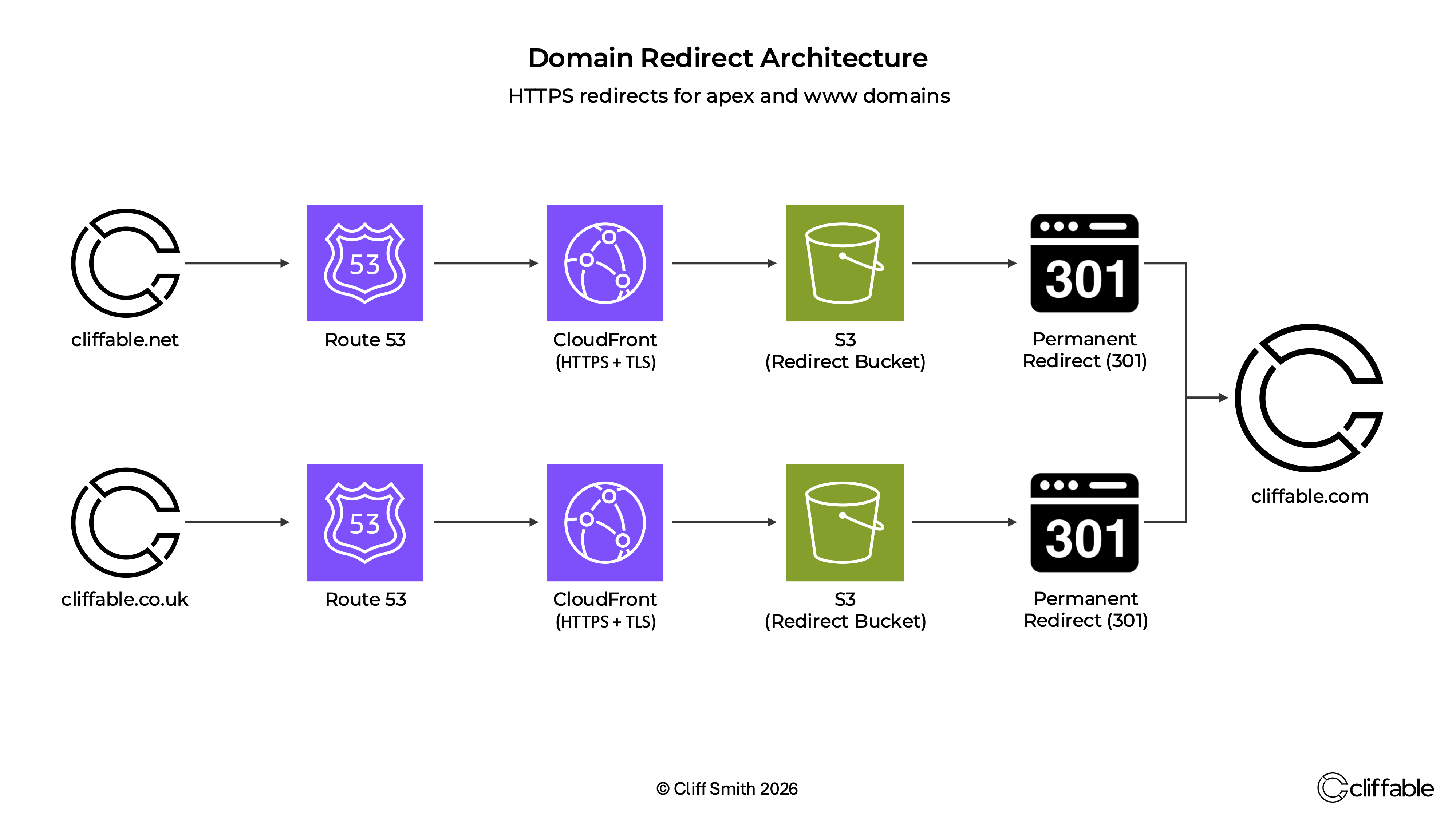
As the site developed, I consolidated the Cliffable domains into the dedicated AWS account and configured secondary domains to redirect permanently to the primary domain.
The primary site remains cliffable.com, while cliffable.net, www.cliffable.net, cliffable.co.uk and www.cliffable.co.uk now redirect to it using HTTPS.
Because S3 website redirects only support HTTP, I used CloudFront and ACM certificates in front of S3 redirect buckets to provide secure HTTPS redirects for both apex and www domains.
Outcome
The result is a production-ready static website hosted on AWS with secure HTTPS delivery, global content distribution and an automated deployment model. The project also established a GitHub-based backup workflow and a stronger SEO foundation for future growth.
- Created a simple, fast and low-maintenance hosting platform
- Gained hands-on experience connecting core AWS networking, delivery and DNS services
- Implemented automated deployment from GitHub to AWS using GitHub Actions
- Implemented OIDC-based authentication instead of long-lived AWS access keys
- Built a site structure designed for search engine indexing and discoverability
- Implemented secure HTTPS redirects for secondary domains using Route 53, CloudFront, ACM and S3 redirect buckets
Next Steps
Continue expanding the site with new projects and Engineering Notes, while refining the content, architecture diagrams and publishing workflow.
Future improvements may include automating updates to the homepage and Engineering Notes index page, reducing the manual steps required when publishing new content.